
Window Peeper AI Prompt — Free Copy and Scene Breakdown
Copy an original Window Peeper AI prompt for an authorized adult portrait. Read the camera, burger, stare and curtain beats, model parameters and test limits.
Last updated: 2026-10-23
This Window Peeper AI prompt is an original candidate for a single adult portrait and the apartment-to-curtains joke. You can copy the full text without signing in. The current Wan recipe uses a full-body image, the original portrait and a 14-second reference video. The video controls the camera and performance; the two images control appearance. The recorded v2 result below is historical and does not validate this new recipe. Version 2 completed one Seedance 2.5 model test on October 23, 2026: the saved base video measured 14.04 seconds at 720 × 1280 with no audio. That single test does not establish consistent likeness, an exact viral recreation or working production delivery.
Jump to the full prompt · See tested settings
Build the joke from five beats
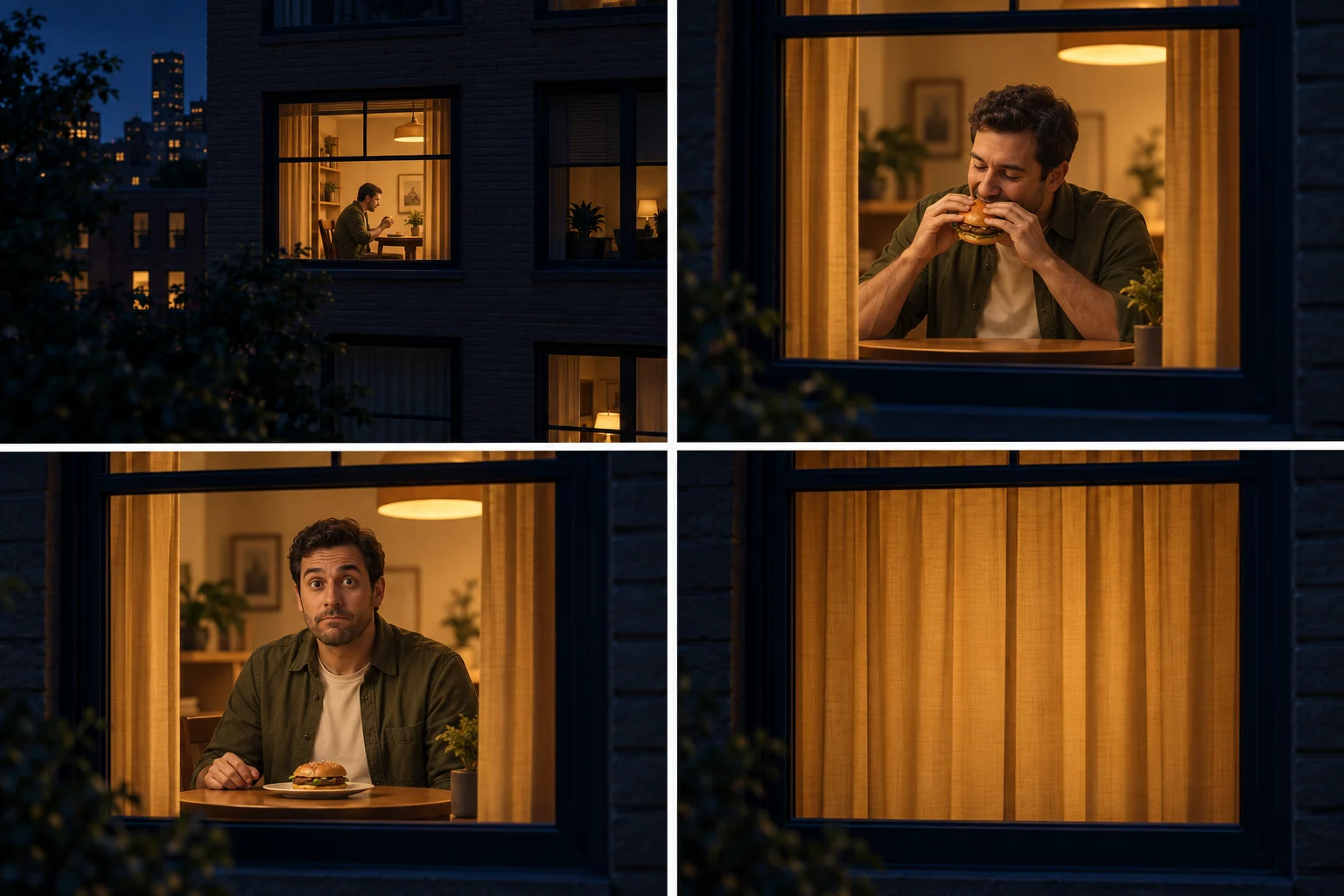
AI-generated storyboard, read left to right, top to bottom. It explains the intended actions; it is not a frame sequence from our video test.
- Establish distance. Start outside a nighttime apartment, so the approach has somewhere to go.
- Move toward one lit window. Keep camera direction and the room consistent; this connects the distant opening with the person.
- Make the burger action readable. A plain, unbranded burger gives the adult an ordinary action before the interruption.
- Let the person notice the viewer. Pause on the awkward stare rather than skipping straight to the ending.
- Close the curtains completely. Finish with the view covered; a hand near a curtain is not the intended payoff.
In the one recorded test, sampled frames showed the approach, bite, stare, burger being put down and complete curtain closure in order. The building exterior was very dark. This observation is specific to that synthetic portrait and recipe version; it does not predict another render or establish exact beat timings.
Copy the Window Peeper AI prompt
Use 视频1 as the timing, camera and performance reference for one continuous 14-second vertical 9:16 window comedy shot. Follow its progressive phone-like enlargement of the lit window, slight framing drift, pause, eating, eye movements, rise and sudden final curtain sweep. Keep the same apartment, window perspective, table, bag and carton placement. Stay outside the glass throughout; do not invent a drone fly-through or a new camera angle.
图1 is the generated full-body reference of our adult. 图2 is their original portrait and is the authority for their face, hair and recognizable identity. Replace only the diner in 视频1 with this same adult. Face and hairstyle follow 图2; body proportions and complete outfit follow 图1 while retaining the original visible clothing. Do not copy the reference diner's identity or outfit. Ignore the backgrounds of both images. No additional people.
Match the reference beats: initially absorbed in taking a burger bite, looking down; then the eyes suddenly find the viewer, a brief pause in the chewing and a restrained startled awareness before the long uncomfortable direct gaze. Keep the burger held until the reference diner puts it down. Do not stare from the opening, smile, wave, exaggerate fear or freeze all motion. Preserve small chewing and eye movements. Near the end, put the burger down, lean forward, rise and reach to the curtain on the viewer's right. The held stare gives way to decisive movement; sweep the curtain quickly from right to left with natural billowing, cutting off the viewer. Match the reference timing and end on the fabric, not on an extended empty hold.
Preserve the visual reaction and physical movement rather than adding extra gestures. Consistent face, hands, clothing and room. Plain unbranded packaging, no captions, watermark, speech or singing. Produce silent picture only; the matching reference soundtrack is added unchanged after rendering.
Prompt version: window-peeper-wan-v1. Candidate output: 14 seconds, 720p, 9:16. A fixed soundtrack is added after rendering. These are requested parameters, not measured results.
Use the Window Peeper AI prompt in a compatible tool
Copy the entire block, attach one authorized adult portrait as the identity reference, and select a model that supports both image references and a continuous multi-action video. Keep the burger, pause and full curtain closure together: removing the last action changes the joke. In a tool with no image-reference support, text alone cannot specify your face.
Keep the image 1 / image 2 / video 1 reference order shown in the prompt, adapting the notation to your tool. Set the ratio, length and audio in its controls where supported; mentioning them in prose does not override its limits. Review any price before submitting. The text is free; the service that renders it may charge.
You do not paste this prompt into our homepage: the generator uses this published version automatically. To inspect its evidence first, watch the reviewed test. Editing the text creates a new, untested variation.
Input and model conditions
Use one clear, authorized adult portrait. First prepare one full-body image with the same face, hairstyle and outfit. For the Wan video request, image 1 is that full-body image, image 2 is the original portrait, and video 1 is the matching scene reference. Both images are reference inputs, not opening frames.
The current recipe uses APIMart gpt-image-2 at 1k and 2:3 for preparation, then wan3.0-video with generation_type: "reference", two image_urls, one video_urls item, size: "9:16", duration: 14, resolution: "720P" and audio: false. Content checks remain enabled. The application adds the matching fixed soundtrack afterwards. Reference input and output durations count toward Wan's limits and billing. See the Wan API documentation, checked October 23, 2026. The prompt alone is not the complete recipe; use only reference media you are allowed to process.
A different API may treat an image as a first frame or use another reference syntax. Adapt the request to that API rather than copying undocumented settings. Copying this text does not reproduce private upload handling, moderation, file validation or task recovery.
Add sound after the picture is ready
This prompt requests the base picture without audio. A fixed soundtrack can be added afterwards without generating the video again. We checked that workflow locally using a separate reference-audio mix; it does not establish soundtrack redistribution rights or production storage delivery. Use an audio file you are allowed to include in the exported video. Asking the model to generate sound is a different option and does not guarantee the same track as the original trend.
Window Peeper AI prompt: tested settings and limits
| Item | Recorded v2 test |
|---|---|
| Model | APIMart seedance-2.5 |
| Input | One synthetic adult portrait, used as identity reference |
| Requested output | 14 seconds, 720p, 9:16, audio off |
| Saved base file | 14.04 seconds, 720 × 1280, H.264 MP4, no audio track |
| Observed sequence | Approach, bite, stare, burger put down, full curtain closure |
| Visible limitation | Building exterior too dark to show much detail |
| Evidence boundary | One run; no controlled comparison or measured success rate |
The text's request to preserve a face is an instruction to the model, not a promise. Parameters are documented to make the example inspectable, not to imply that every compatible service produces the same result.
Can I shorten the Window Peeper AI prompt or video?
You can edit the Window Peeper AI prompt for a tool with a shorter limit, but the shortened version has not been tested here. Preserve the action order and leave time for the final closed curtain. Do not label a shorter result as the measured 14.04-second example, or assume that faster motion will preserve the joke.
What can go wrong
Identity may drift as the camera approaches. Hands and the burger may deform, the camera can jump, and the curtains may fail to close. One completed sequence does not rule these problems out. We have no matched comparison proving that version 2 fixes a prior failed run, and no success-rate claim. The reviewed example retains its original conditions and permission review. Neither a model test nor local playback establishes production delivery.
Prepare a clear portrait using the photo guide. Check the full result before publishing, use only music you are allowed to use, and follow the platform's AI-labeling rules. This prompt does not grant rights to somebody's portrait, a brand or the original soundtrack.
Read the complete guide · Read the scene background · Check generator availability