
How to Make a Window Peeper AI Video — Free Guide
Make a Window Peeper AI video: use the browser generator, prepare one adult portrait, use the free prompt and know what costs money.
Last updated: 2026-10-23
You can make the Window Peeper AI joke with this website's portrait-to-video workflow. Review the current generator and pricing before starting. One recorded test completed the scene; you can inspect its conditions on the examples page. The guide and candidate prompt are free, with no account required.
Candidate specification: One portrait; 14 seconds, 720p, 9:16, Fixed soundtrack. These are current request settings; the October 23 test measured 14.04 seconds at 720 × 1280 without audio.
One-time credit packs: 10 credits: 6.90 USD · 20 credits: 11.90 USD · 40 credits: 21.90 USD · 70 credits: 36.90 USD · 120 credits: 62.90 USD.
Choose your Window Peeper AI route
Two routes work here. In the browser generator, prepare one authorized adult portrait and the intended result is a newly generated apartment scene, rather than a face pasted into a template. No editing app or timeline is needed. Or copy the free candidate prompt into a video model you already use and adjust it yourself. Before generation, use the free material below or inspect the scene background.
Prepare the person in the window
Use one consenting adult, facing forward or at a slight angle. Keep the face large enough to inspect, sharp, evenly lit and clear of sunglasses, masks and hair across the eyes. A group, a tiny face in the distance or a very dark side profile makes the intended identity ambiguous. Do not use children, celebrities or somebody who has not agreed.
The current file checks accept JPG, PNG and WebP, up to 10 MB, with at least 512 pixels on the short side. The image must not have an extreme aspect ratio. Browser conversion prepares a JPEG for the private upload; it does not prove that a supplier will accept the portrait or preserve its identity.
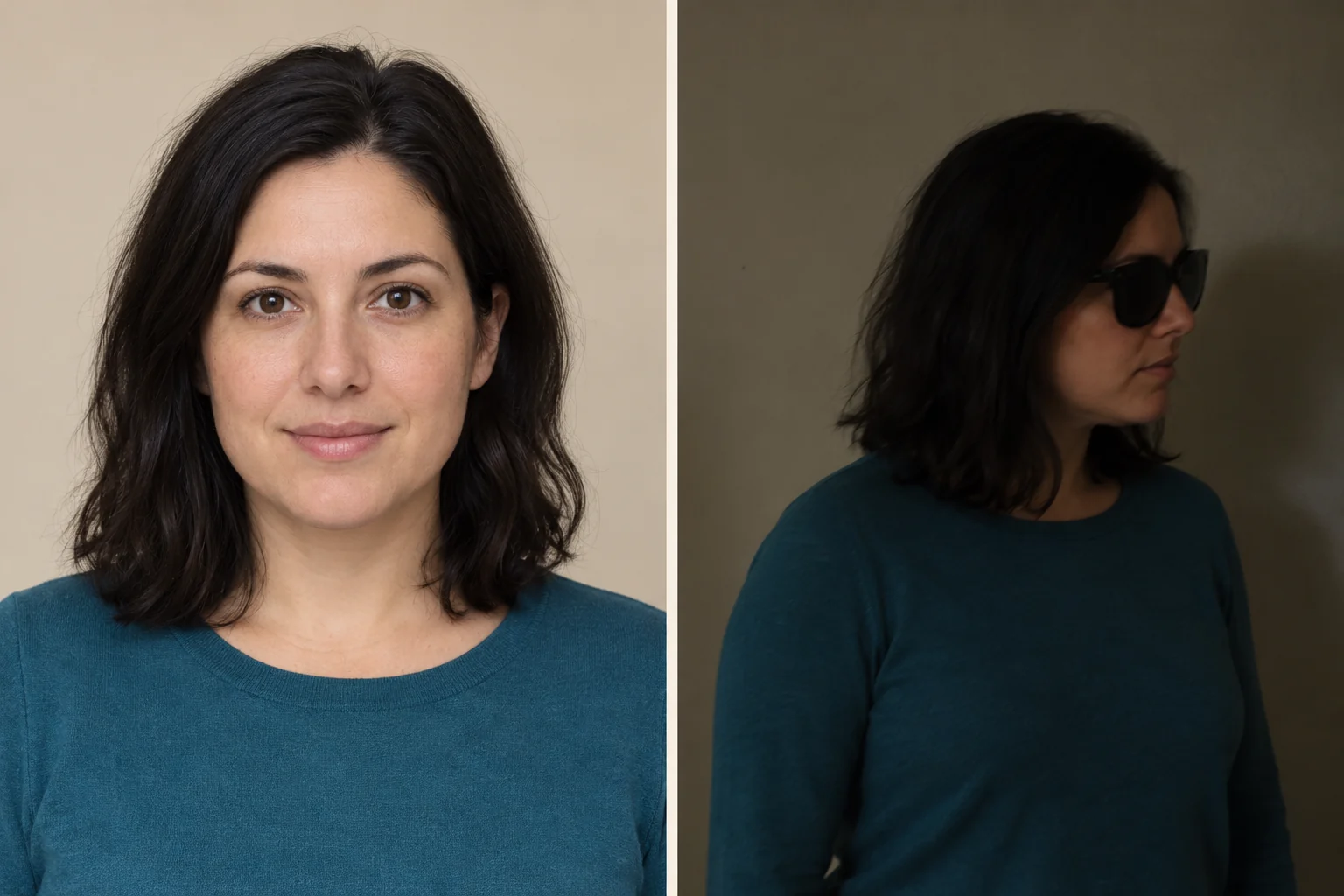
Photo preparation illustration: choose a clear, evenly lit view like the left; avoid an obscured, dim profile like the right. Both are synthetic portraits, not product tests.
From photo to a saved Window Peeper AI video
The following describes the implemented flow from a selected photo to a saved Window Peeper AI video.
- Open the generator and select one portrait. Merely selecting it keeps the file on your device.
- Read the input requirements, authorization statement, current output and price. The Wan workflow prepares a full-body reference, recreates the 14-second scene and adds a fixed soundtrack. Review any music permissions before publishing.
- Sign in if needed. The browser tries to retain your local photo draft for the return. If browser storage cannot retain it, choose the photo again; a selected file is not proof of server upload.
- Buy credits only if needed. A return from checkout is not payment confirmation: the server confirms the order and updates the balance. Do not buy again because a redirect is slow.
- Explicitly choose Make my Window Peeper video. A 480p task uses 10 credits; a 720p task uses 20 credits from the same balance. Buying a pack never starts generation by itself.
- Wait or leave the page. Open My videos from the header, or return to the generator's My videos tab. Refreshing finds the saved task rather than starting it again.
- Play the completed result, inspect the full clip and choose Download MP4. A result is ready only after it is saved in the service's storage and its output specification is checked.
The recorded model run took 417 seconds; it is one observation, not a promised turnaround or a measurement of the complete checkout-to-download journey. An uncertain supplier submission needs a status review; repeatedly pressing Generate is not a recovery method.
Window Peeper AI publishing and phones
The intended browser route covers photo selection, private upload, generation, task recovery, playback and MP4 download. Posting to TikTok, Reels or another service is a separate action. Add music only if you have permission to use it, and follow that platform's AI-content labeling rules. Do not present a fictional scene as real surveillance footage.
The responsive interface has a mobile layout, but real phone file selection, playback and file saving have not yet been verified. When a result exists, use its download control; the location and share/save choices depend on the browser. A desktop browser preview is not proof that every iPhone or Android export path works.
Check the Window Peeper AI video before posting
Watch the complete clip once, then check the approach, face, hands and last frame. The person should be the same adult throughout; the burger should be put down before the hand reaches for the curtain. The ending should cover the window completely. Our single test achieved that sequence but had a noticeably dark building exterior. A still frame cannot establish continuity.
Give the fictional scene your own caption: “My dinner has an audience” or “Closing time for unexpected guests.” These are original caption ideas, not quotes from the source video. Keep the AI label where the platform requires it. Tags do not promise reach.
Window Peeper AI video: what is free and what costs money
Reading the Window Peeper AI guide, copying the candidate prompt and opening the linked pages cost nothing here. This is not a free full-video offer. When available, our video generation uses 10 credits per 480p task or 20 credits per 720p task; one-time packs and refund conditions are on Pricing.
Problems, task status and support
A photo is rejected
A local file rejection means its format, size or dimensions failed the checks above. Choose a suitable file. If the supplier rejects an accepted upload, read the recorded failure and returned allowance before trying a different authorized adult portrait.
The face, hands or ending look wrong
Face drift, deformed food, camera jumps and missing curtains are possible AI defects. Keep the task ID and describe the issue to support. No scene-specific repair has been validated here. A new paid attempt is a new task, not a guaranteed fix.
A task says “Needs review” or its status is unknown
The supplier may already have received the task. Do not resubmit automatically or purchase again to recover it. Contact support with the existing task ID so its status can be checked.
A task has a confirmed technical failure
The task ledger returns the credits used exactly once. Check both the task and balance. An allowance return is not a cash refund; Pricing explains the separate billing process.
Playback or download fails
A saved result or its access link may be temporarily unavailable. Reload access to the existing result. Do not create another video to recover a file you already generated.
No Window Peeper failure-and-retest pair has been published here yet. Portrait advice is input guidance, not a measured guarantee of better likeness or curtain motion. For billing, rights, removal or task review, use the support route; never email a password or payment card information.
Read the free prompt · Check actual tests · Return to the generator